

Android 15 in comparison to Android 14
So 2025 is going to be a weird year. Actually we’ve got Android 15 on Vivo phones before it even came to Pixel phones. Yep—strange times. But the official update of Android 15 is here now, we’ve tested it and honestly? It’s principally because the changes within the system tend to be very slight. And when I say subtle, I mean the kind where if you blink once even, you will miss half of them.
If you want to know what is actually new in Android 15 in comparison to Android 14 then read this article till the end.

Visual Changes: Mostly Cosmetic, Barely Noticeable
Let’s start off with the visuals – because they hardly changed anything.
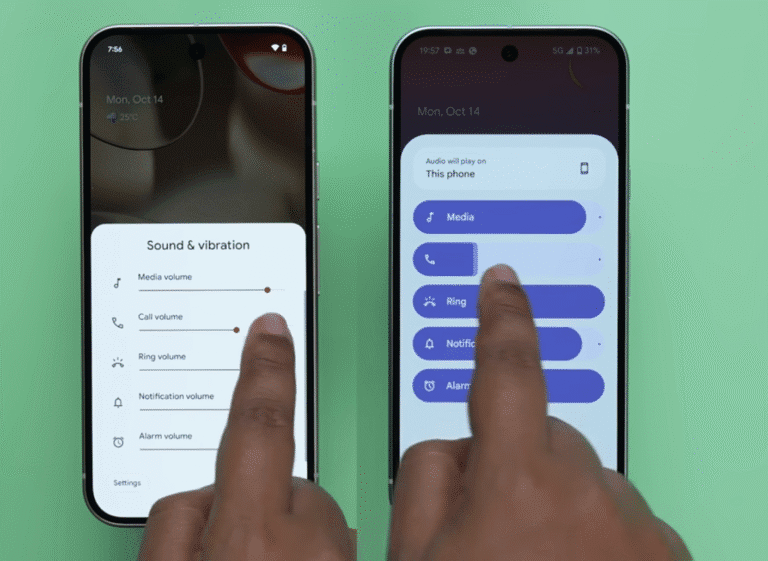
The “New-ish” Volume Menu
The expanded volume menu now has a rounded pin-like slider also instead of the old thin bar.
It has a modern look, smooth appearance, and honestly just seems to be more polished. And when you change the volume, the animation finally looks like it actual belongs in 2025 – not 2018.
Direct audio switching is what is the real upgrade here. You can now choose:
Phone speaker
Bluetooth earbuds
Neckband
External devices
All from the volume page itself: no need dig in settings as it used to be.
Settings App Redesign (AKA “Let’s Copy 3 Different OSes”)
The “Settings” heading disappeared. Your Google account icon wasn’t there at the top (moved deeper inside).
And virtually everything in the settings menu is now contained inside a boxed and bounded container.
It’s like Google had its inspiration from:
iOS (for the size of the account placement and size of the search bar)
Nothing OS (for the boxed layout)
OneUI (with regard to the spacing and hierarchy)
And pounded them into something that actually looks clean.
Widgets Get Smarter
Widget changes:
No dragging to add widgets anymore – just tap “Add widget”
A new row with suggestions of widgets:
Essentials
Suggested
Social
Basically Android saying:
“Hey, we saw you only use two widgets anyway, but here – have some recommendations.”

Bluetooth Quick Toggle Improvement
Turn Bluetooth off -> android asks whether it’ll turn it back on auto tomorrow.
Small but thoughtful, etc., people who always forget to turn it back on.

The Star of the Update
This is where Android 15 redeems itself a little.
Private Space – The Update’s Star.
Private Space is located at the bottom of app drawer. You can:
Hide apps
Lock it with fingerprint
Make copied sets of apps (“like an other WhatsApp”)
Install apps that do not appear in the main drawer
It’s basically:
Secure Folder from Samsung
Dual Apps from Xiaomi
App Cloner from OnePlus
All coalesced into stock Android.
It’s one of the most practical of all the additions in years.
App Archiving – Right Out of iOS’ Playbook
Long-press → App Info → Archive
Android deletes the app, but retains the data.
Perfect for apps that you have not used very often but don’t want to get rid of.
This is super helpful on 64GB+ phones but where every MB matters.
Partial Screen Sharing
Now that you have shared your screen you have the following two options:
Full screen
Only one app
All the personal notifications get hidden automatically.
Perfect for:
Presentations
Work calls
Tech support
Those times where you don’t want your friends to see your 24 unread WhatsApp messages

Theft Protection — Actually Impressive
Theft Protection does a number of things:
Auto-lock the phone if it is snatching (generates accelerometer + gyro + speed algorithm)
Track myself the phone even if the thief locks it
Use nearby devices (BLE mesh network – Android devices) to ping location
Remotely lock tracking, locate, or erase your device
We have tried simulating a phone snatch . . . didn’t work. But hopefully it works in real cases.
Phone as Webcam (Finally Native!)
Conecte par USB –> Selection of “Use as Webcam”
Previously available on:
Motorola phones
Samsung with Dex
Third-party apps
Now it’s native. About time.
Fingerprint Authentication USB Transfer
Whenever you try to:
Transfer data
Use USB tethering
Debug using ADB
Android is now asking for your fingerprint.
More security never hurts.
Adaptive Vibrations – The One Nobody Called For
In quiet places it vibrates more softly on the phone, is harder in the loud place.
Cool idea but will your phone even be able to detect the environment properly?
You’ll need a flagship that has good haptics.

Animation & Performance Improvements
Smoother App Minimizing
The transition is a more fluid kind of transition, like a toned-down iOS animation.
Not a huge deal but it is nicer.
Always-On Display Tiny Tweaks,
There is a difference – but you may have to get a microscope to see it.
Settings Menu Micro-Animation
Opening and closing submenus provide you with a tiny preview of the preceding screen.
It’s subtle but it makes navigating a bit more organic.
Brightness Slider gets a 50% Marker
This is probably the best small addition.
Finally, you are really bright i
Features in Beta That Didn’t Make the Final Cut (Sadly)
We discovered some interesting things in beta builds that did not survive:
Lock Screen Widgets (Pixel Tablet Only) Fourth.
Google: Add this to phones. Please.
The following are the advantages available in Samsung Galaxy phones: – The advantages of Samsung DeX like a Desktop Mode – ✔
Discovered by Mishaal Rahman.
If Google brings this back… Android laptops may become a reality after all.
Like iOS, the section covering battery health is checked by:
Still missing in the final build
And honestly? This is the ONE feature that everyone wants.
Performance & Stability
We tested Android 15 on:
Pixel devices
Vivo devices
A few AOSP-based builds
Performance is:
Stable
Smooth
Slightly improved multi-tasking
Faster app launch times
Improved thermal management
Battery life is about as it was on Android 14 – perhaps slightly improved on Pixels because of the improvements to background app control.
Final Verdict: Android 15 Is Like Half a Step Up
When we started researching Android 15 we had big hopes for big, meaning changes.
Instead, we got:
Minor animation upgrades
Subtle UI tweaks
A few actually useful features
Nothing ground-breaking, nothing revolutionary.
Android 15 doesn’t feel like a full jump from one version to the next, it feels more like Android 14.3.
It’s high time Google thought of a major visual refresh.
Material You was introduced years ago – and hasn’t changed much since.
What do you think of Android 15? Let me know in the comments.
And as always – keep tracking, and be safe.