

PCTester Pro Diagnostics Suite
Standalone hardware testing for Windows and macOS: keyboard, mouse, display, battery, audio, webcam, touchscreen and USB.
Download PCTester Pro
PCTester Pro for macOS
PCTester Pro for Windows
System Overview
Chip maker, architecture, clock speed and core/thread counts.
Installed memory and current usage.
Shows your external address and provider. This is the only panel that uses the internet.
OS version, build number and architecture.
Interface Preview
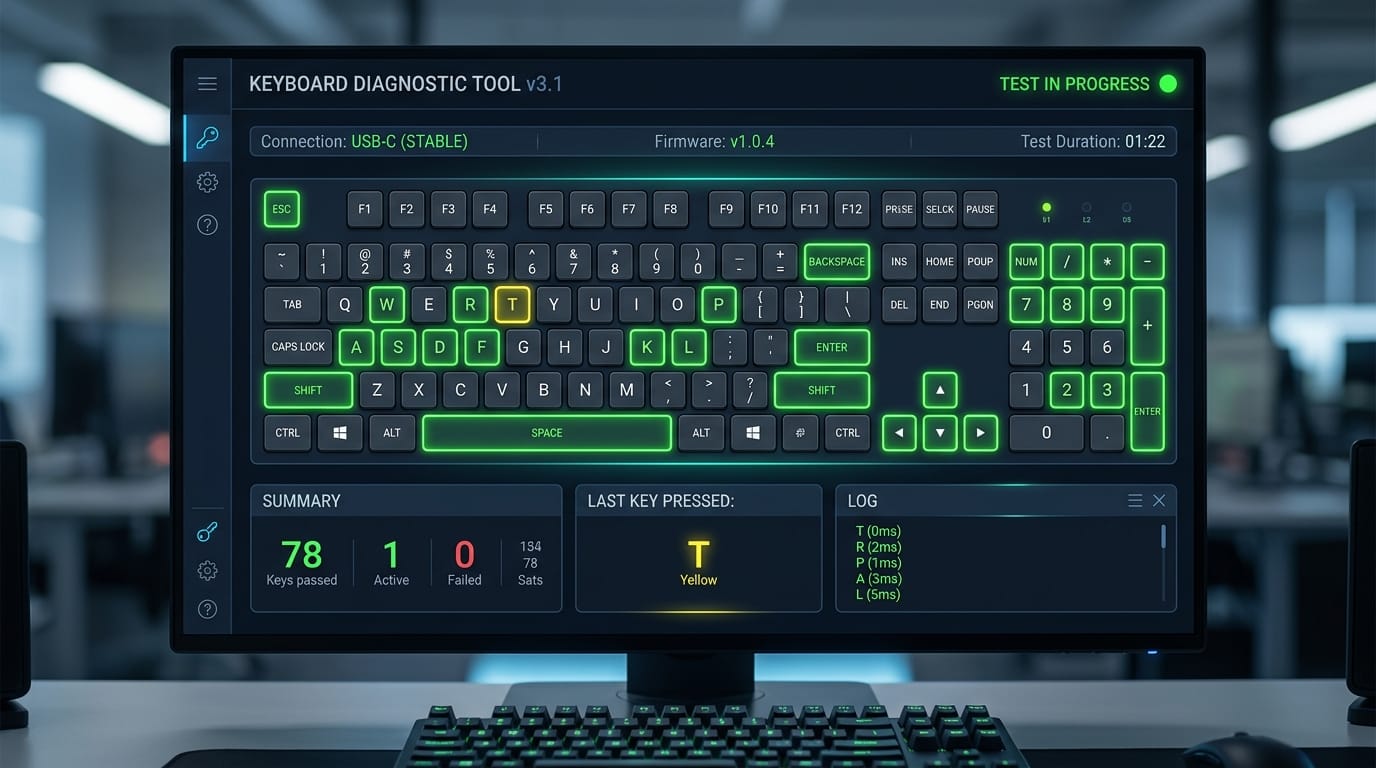
Keyboard Matrix & Rollover
Real-time key detection with highlighting for pressed keys.
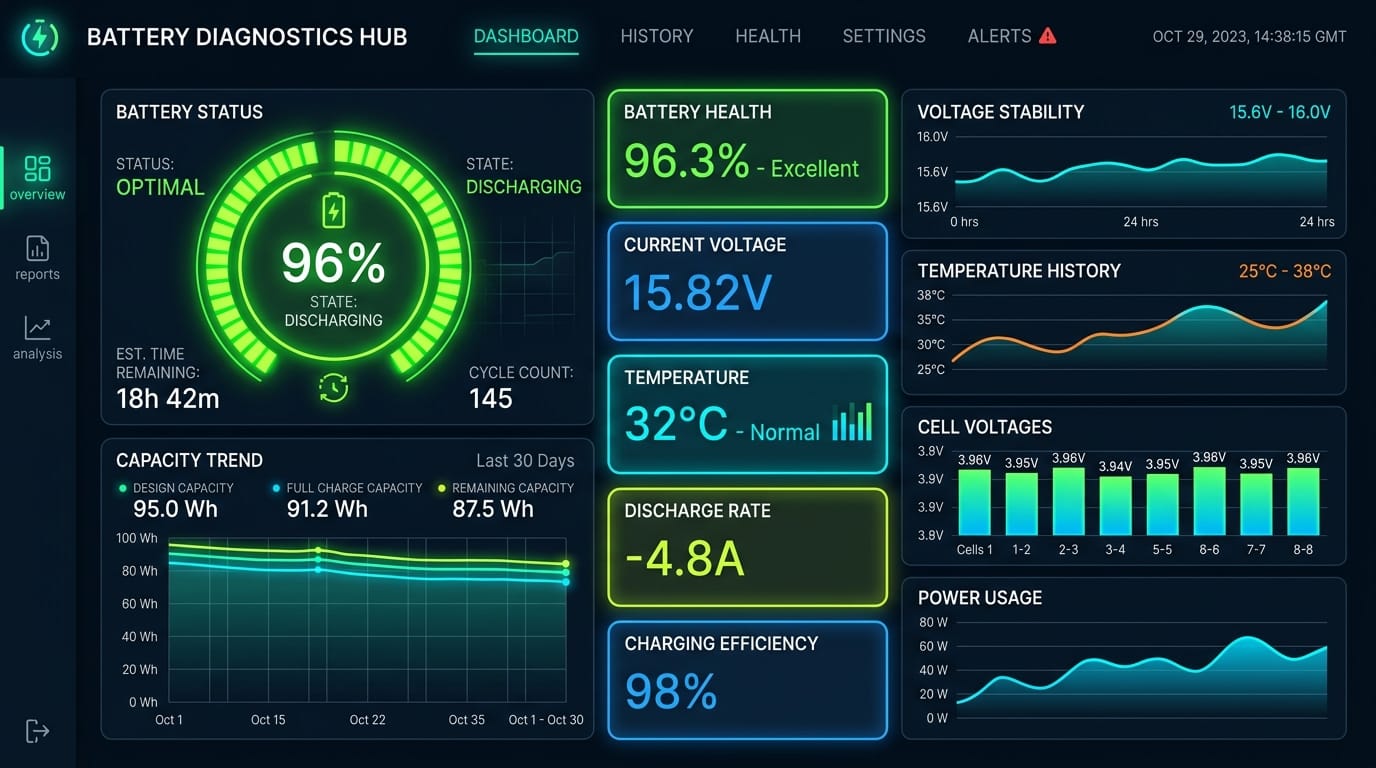
Battery Health & Cycles
Capacity, voltage and temperature readings.
Diagnostic Modules
Keyboard Matrix & Key Chatter
Checks every key, the modifiers and rollover. A key that types twice (chatter), never registers, or lights up the wrong position points to a worn switch, debris or a matrix fault.
Mouse Microswitch & Scroll Wheel
Measures click timing to the millisecond. Two clicks a few milliseconds apart from one press means a worn microswitch, and a scroll wheel that skips or reverses points to a dirty or worn encoder.
Webcam Stream
Shows the camera feed in a local window to check focus, color balance and frame rate. A green or purple tint, constant flicker or a black frame suggests a sensor, driver or privacy-switch issue. Nothing is uploaded.
Display Dead Pixel & Backlight Bleed
Cycles full-screen colors so dead pixels, stuck subpixels and uneven backlight stand out. Use a dark room: black shows bleed and glow, white shows stains, and the red, green and blue screens reveal stuck subpixels.
Battery Health & Cycle Count
Compares current full-charge capacity with design capacity and reads cycle count, voltage and temperature where the system exposes them. A large gap between the two capacities means the cells have aged and runtime will be short.
Bluetooth Controller
Reports whether the Bluetooth controller is present and working and which devices are connected. If it shows no controller, check the driver, airplane mode and any hardware switch first.
Stereo Audio & Speaker Test
Plays tones on the left and right channels. Sound from the wrong side means swapped channels; crackle or rattle points to a damaged driver; silence on one side is worth testing again with headphones.
Touchscreen Grid
Maps touches on a grid. Cells that never respond are dead zones, touches that appear where you did not touch are ghost touches, and multi-touch checks confirm that several fingers track at once.
USB Controller & Bus Inspector
Lists connected devices with their negotiated link speeds. A USB 3 drive linking at USB 2 speed usually means a bad cable, a wrong port or a loose connector, so try another cable and port first.
Prefer Not to Install Anything?
PC Tester also offers 50+ browser-based diagnostic tools that run without a download. Browse them all in the PC Tester tools library to check your keyboard, mouse, screen and more directly in your browser, then use PCTester Pro for deeper checks such as battery cycles and USB link speeds.
Verify Your Download
Each hash is of the .zip file you download, not of the app inside it.
Windows
3e0fc563781b15196a44f0cc13878df7cd85e8b5147a10fa3640143c2da14b72
PowerShell: Get-FileHash .\PCtester-winpack.zip -Algorithm SHA256
macOS
96caef1b3ea062ce4e79ecabef3f93feeb5f7bb0c775d78a55e83d74a52c2956
Terminal: shasum -a 256 ~/Downloads/PCtester.dmg_.zip
If your value differs, do not run the file.
Scan it yourself
Upload the zip to VirusTotal, or compare its hash there. Only run a file whose hash matches the value above. Windows SmartScreen or macOS Gatekeeper may show a first-run warning for downloaded utilities; if your hash matches, this is expected behavior for apps without a widely known reputation.
Privacy: What PCTester Pro Does on Your Network
- Hardware tests run locally and need no internet connection.
- One optional panel uses the network: "Public IP & ISP" contacts an external IP-lookup service to look up your address, and only when you open that panel.
- Webcam frames stay on your device.
- No analytics or telemetry. Nothing is bundled that sends usage data.
- Windows: a standard account works for most tests; battery and USB details may need administrator rights. macOS: battery data comes from system power APIs, and you may be asked to allow camera access.
Website
Like most websites, pctester.online may record standard server logs (IP address, browser type, pages requested) for security and reliability. Fonts load from Google Fonts. Browser-based tools process input on your device.
How to Read Your Results
These are general rules of thumb. Compare against your manufacturer's specs where possible.
| Test | Healthy | Warning signs | Next step |
|---|---|---|---|
| Battery | Full-charge capacity close to design capacity. | Capacity far below design, sudden percentage drops, swelling, heat while idle. | Around 80% of design or lower: consider a replacement. Stop using a swollen battery. |
| Keyboard | One character per press. | Repeated characters, dead keys, wrong keys lighting up. | Clean, try another layout, then repair. Rollover limits can be a design limit. |
| Mouse | One click per press. | Frequent double-clicks at very short intervals, skipping scroll. | Try another surface and connection, then replace the switch or mouse. |
| Display | Uniform solid colors. | Always-black or always-lit dots, tinted patches, bright edges. | Check the dead-pixel policy before buying. Some edge glow is normal on LCD. |
| Audio | Left tone from the left, right from the right. | Swapped sides, crackle, rattle, one silent channel. | Test with headphones to separate speaker faults from software issues. |
| USB | Devices link at their rated speed. | USB 3 device at USB 2 speed, dropouts, undetected port. | Try another cable and port first. |
| Touchscreen | Every grid cell responds. | Dead zones, ghost touches, unresponsive edges. | Clean, remove the protector, retest. |
When to Run a Hardware Check
Buying a used or refurbished laptop
Run the keyboard, display, battery and USB tests before you pay. Worn battery capacity or stuck pixels give you leverage on price.
After a repair or upgrade
Confirm the parts the technician touched still work.
Tracking down odd behavior
Repeated characters, phantom clicks and dropped USB devices often have a hardware cause you can isolate here.
Setting up a new device
Test inside the return window so a defect means a replacement, not a repair.
Frequently Asked Questions
Is PCTester Pro safe?
Compare the SHA-256 hash of your download with the one published on this page before running it, and see the scan and signing status above.
Can I run it offline?
Yes. All hardware tests work without internet. Only the optional Public IP panel needs a connection.
Do I need administrator rights?
Most tests work with a standard account. On Windows, battery and USB controller details may need administrator rights. On macOS, the system may ask you to grant camera access.
Does it support Apple Silicon?
Yes. The macOS build is a Universal Binary for Apple Silicon and Intel Macs.
About PC Tester
PC Tester builds free tools that help people check whether their computer hardware works properly, from browser-based keyboard and screen tests to the downloadable PCTester Pro suite for Windows and macOS.
Adeel Farooq, Founder of PC Tester — 50+ browser-based diagnostic tools built, working in PC hardware diagnostics since 2013.
Terms of Use
- License: PCTester Pro is free for personal and commercial diagnostic use. Do not resell it or present it as your own product.
- No warranty: The software and results are provided "as is". Results are indicators, not guarantees; confirm serious faults with a qualified technician or the manufacturer.
- Liability: To the extent allowed by law, PC Tester is not liable for damages from using the software or site. Back up important data before troubleshooting hardware.
- Trademarks: Apple, macOS, Windows and other names belong to their owners; PC Tester is not affiliated with them.
Contact
Questions, bug reports or feedback? Reach us on X at @pctester. Please include your operating system, the PCTester Pro version (currently 2.4.1) and the test you were running.
Adeel Farooq, Founder of PC Tester — 50+ browser-based diagnostic tools built, working in PC hardware diagnostics since 2013. More about the author.
Apple, macOS, MacBook, Windows and other product names are trademarks of their respective owners. PCTester is an independent utility and is not affiliated with or endorsed by Apple Inc., Microsoft Corporation or any other trademark holder.